Upgrading the Spectrum
The mods you can fit to a Spectrum, a ZX81 or a QL today, and what to know first.
SD cards instead of cassettes, HDMI, new memory in place of the chips that fail and regulators that don't run hot: what exists for your Sinclair, who makes it and which models it fits.
- 23
- 8
- 54
Why modify a Spectrum
A Spectrum is now more than forty years old, and its weak points are well known. The video comes out through an RF modulator, made for the televisions of the day [13]. Programs come on cassette. The lower 16 KB of the 16K and 48K sit in 4116 chips that are no longer made [25], and the 7805 regulator runs so hot that, on the 128, it needed a large heatsink outside the case [13].
The community responded with new parts: interfaces that load games from SD or CompactFlash cards [1], virtual cassette players [7], HDMI and VGA outputs [19] [21], modern memory modules [25], and even replacement ULAs and new motherboards [52]. The ZX81 and the QL have theirs too: composite video and colour on the ZX81 [22] [24], a new ROM and Microdrives on an SD card on the QL [36] [38].
Many of these solutions are made by one or two people, and that shows in their availability. ByteDelight, which made several of the interfaces on this page, closed orders in December 2025 [5]. We note this on each one's card.
And if you want it all at once, the ZX Spectrum Next is something else: a new computer, with the Spectrum rebuilt in an FPGA, funded on Kickstarter in 2017 and delivered with a case in 2020 [13]. It isn't a mod, so it doesn't appear on this list.
Original or modified
A Spectrum as it left the factory is worth more to a collector than one full of wires. The good news is that the Spectrum has an expansion port at the back, and many of the best mods plug in there without opening the machine: the DivMMC [4], the Spectranet [44], the ZX-HD [19] or the ZX-AY [39]. Take the interface off and the computer goes back to how it was.
Others work on the inside but can be undone: the 48K composite video mod can be reversed whenever you like [14], and the +3e ROMs swap back for the originals, which sit in sockets [31].
And then there are the ones that stay: changing resistors in the +3's sound circuit [40], soldering a switching regulator in place of the 7805 [26] or desoldering the ZX81's modulator [23]. On each mod's card we say whether it is reversible.
Before you start, check which board you have. The 48K had many revisions over its life [13], and the instructions change from one to the next: going from 16K to 48K, for example, is done differently on an Issue 2 and on an Issue 3 [27]. Keep everything you take out, in an antistatic bag with a label.
Newer doesn't mean more compatible: many games count the 48K's cycles.
Where to start
First, the machine's health. Electrolytic capacitors dry out with age, and on the 48K, if the DC-DC converter stops supplying the 12 V and -5 V, the 4116 chips of the lower memory can die [28]. Replacing the capacitors is often the first thing to do [28].
To find out what is faulty, a diagnostic ROM such as ZX Spectrum Diagnostics tests the memory, and the beeps it makes at start-up tell you straight away whether the processor and the ULA are working, even with no picture [32].
Next, the picture: composite video on the 48K [14], RGB on the 128K models [15], or HDMI and VGA without opening anything [19] [21]. Finally, storage: a DivMMC with esxDOS reads SD cards and loads TAP files [3] [1]; on the +3, a Gotek can take the place of the 3-inch drive [10].
On the ZX81, the order is similar: composite video [22] and then an expansion such as the ZXpand+, which combines 32 KB of memory and an SD card in a single box [12].
Heat and power
The 7805 on the 16K and 48K sits under a heatsink inside the case, and on the 128 it moved outside [13]. It is a cheap but inefficient regulator; a modern switching module does the same job with almost no heat and does away with the heatsink [26] [47].
Heat also ages what is around it: on Issue 1 and 2 boards, the capacitors near the heatsink suffer most, and the recommendation is to use capacitors rated for 105 °C in those places [28].
For safety: never open a power supply. The 230 V side can give a dangerous shock even when unplugged. The original supplies are forty years old, and in 1983 Sinclair even recalled a batch of 28,000 over the risk of shock in damp conditions [51]. If yours runs hot, hums or smells of burning, replace it with a new, sealed supply, or bring it to the shop.
Mind the voltages. From the 16K to the grey +2 it is 9 V, with negative on the centre pin [48]; the +2A and the +3 use a supply with several voltages, and the +2A's is not enough for a +3 [50]. On a +3 with a Gotek, the internal power cable has the 5 V and 12 V swapped relative to the Gotek [10].
Compatibility
One Spectrum is not always the same as another Spectrum [6]. The 128 runs slightly faster than the 48K (70,908 cycles per frame instead of 69,888), and games that count cycles to draw in the border, such as Dark Star, come out skewed [6].
On the 128K models, the 48K ROM was changed in a free area that some programmers used for interrupts, and those games lock up [6]. On the +2A and the +3 the expansion port, the memory contention and the so-called floating bus all changed; the ZX Interface 1 stopped working, and so did some older games [13] [6].
There are remedies for some cases. Entering 48 BASIC locks the paging and fixes games such as Jetpac; on a DivMMC, which boots into USR 0, you type OUT 32765,48 before loading [6]. On the +2A and the +3, a 470 ohm resistor partly restores the floating bus, enough to fool most of the software that depends on it [53].
The picture upgrades were also designed not to break anything: ULAplus, the specification that gives 64 colours, was designed for maximum compatibility with existing software [20]. Even so, for playing the 48K library, a stock 48K with a DivMMC is still the combination with the fewest surprises.
At the shop
At RetroDreams we fit these mods. Before we touch anything, we tell you what is reversible and what isn't, so you can decide with everything on the table.
If a mod doesn't make sense for what you want from your Spectrum, we'll tell you that too. Often the best upgrade is getting the original machine working as it should: new capacitors, tested memory and a safe power supply.
For a quote, use the repairs form and tell us the model and the mod you're interested in.
Never open a power supply: the 230 V side can kill, even when unplugged. An old supply is replaced with a new, sealed one.
The upgrades
Pick your machine and only the ones that fit it remain.
Storage
SD and CompactFlash cards on the expansion port, virtual cassettes, floppies on a USB stick and Microdrives on an SD card.
DivMMC / DivIDE
- Installation: Plug in
- Reversible
- Open project
Interfaces that plug into the expansion port and read cards. The DivIDE, by Pavel Cimbal, uses IDE drives or CompactFlash cards; the DivMMC, by Mario Prato, uses SD cards and is heavily inspired by the DivIDE [1]. With the esxDOS firmware they read FAT16 and FAT32 cards and load TAP files as if they were cassettes [3] [1]. The original DivMMC has its CPLD files published under GPL-3.0 [2]; the EnJOY! variant, by Ben Versteeg, adds a Kempston joystick [1], and the PRO ONE detects the model by itself and works from the 16K to the +3 [4].
Careful ByteDelight, which made the EnJOY! series, closed orders in December 2025 [5]. On the 128K models the DivMMC boots into USR 0, with paging unlocked, and some games such as Jetpac show a black screen unless you first type OUT 32765,48 [6].
Machines: ZX Spectrum 16K / 48K, ZX Spectrum+, ZX Spectrum 128, ZX Spectrum +2, ZX Spectrum +2A / +2B, ZX Spectrum +3
Official page ↗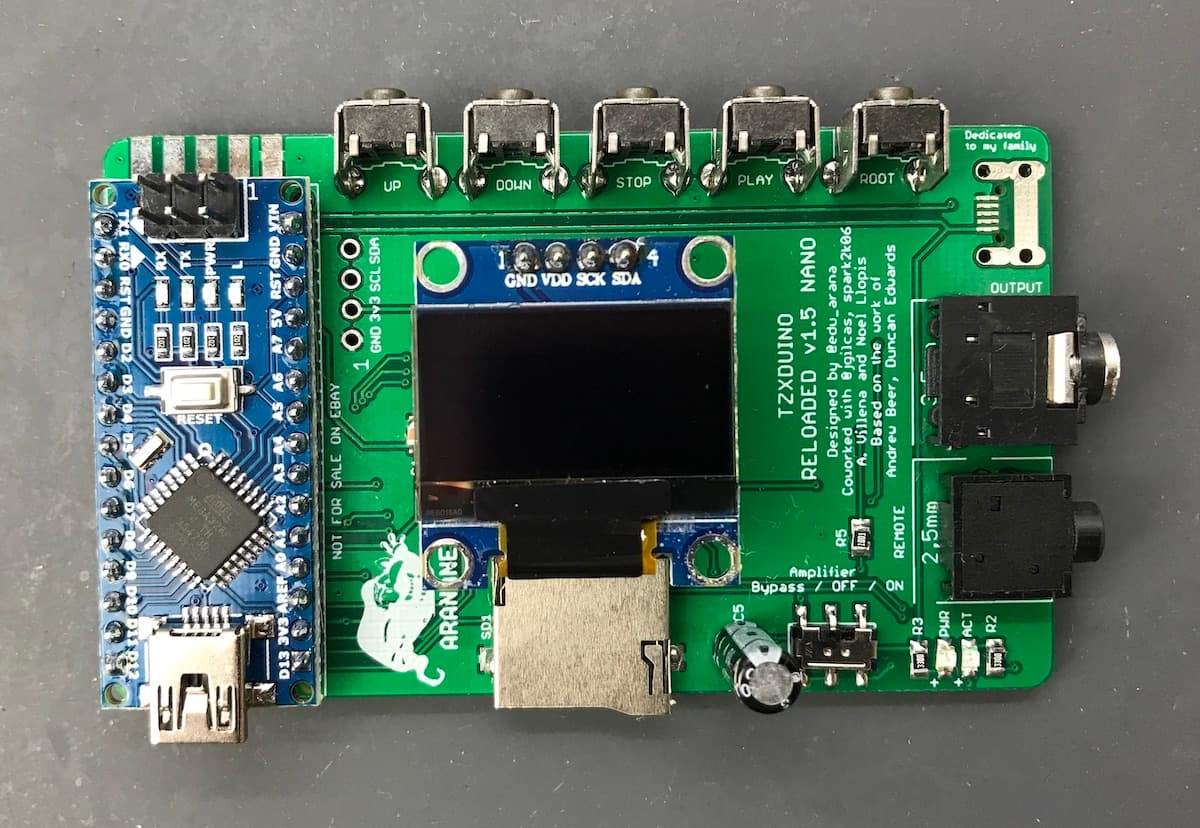
TZXDuino / MaxDuino
- Installation: Plug in
- Reversible
A fake cassette player that plays TZX and TAP files as sound into the cassette input [52]: an Arduino with an SD card reader [9] [7]. The MaxDuino firmware, by Rafa Molina, runs most of these devices and also reads the ZX80 and ZX81 .P and .O files [7]. You don't open the computer: with the TzxDuino-Reloaded you just plug it into the cassette socket [9].
Careful It is sound, like a cassette, and the output level matters: the TzxDuino-Reloaded has a switch to use or bypass the output amplifier [9]. The firmware has no published licence [7] [8].
Machines: Sinclair ZX80, Sinclair ZX81, ZX Spectrum 16K / 48K, ZX Spectrum+, ZX Spectrum 128, ZX Spectrum +2, ZX Spectrum +2A / +2B, ZX Spectrum +3
Official page ↗Photo: Noel Llopis (TzxDuino-Reloaded, arananet) · CC BY-SA 4.0 (repositório) · GitHub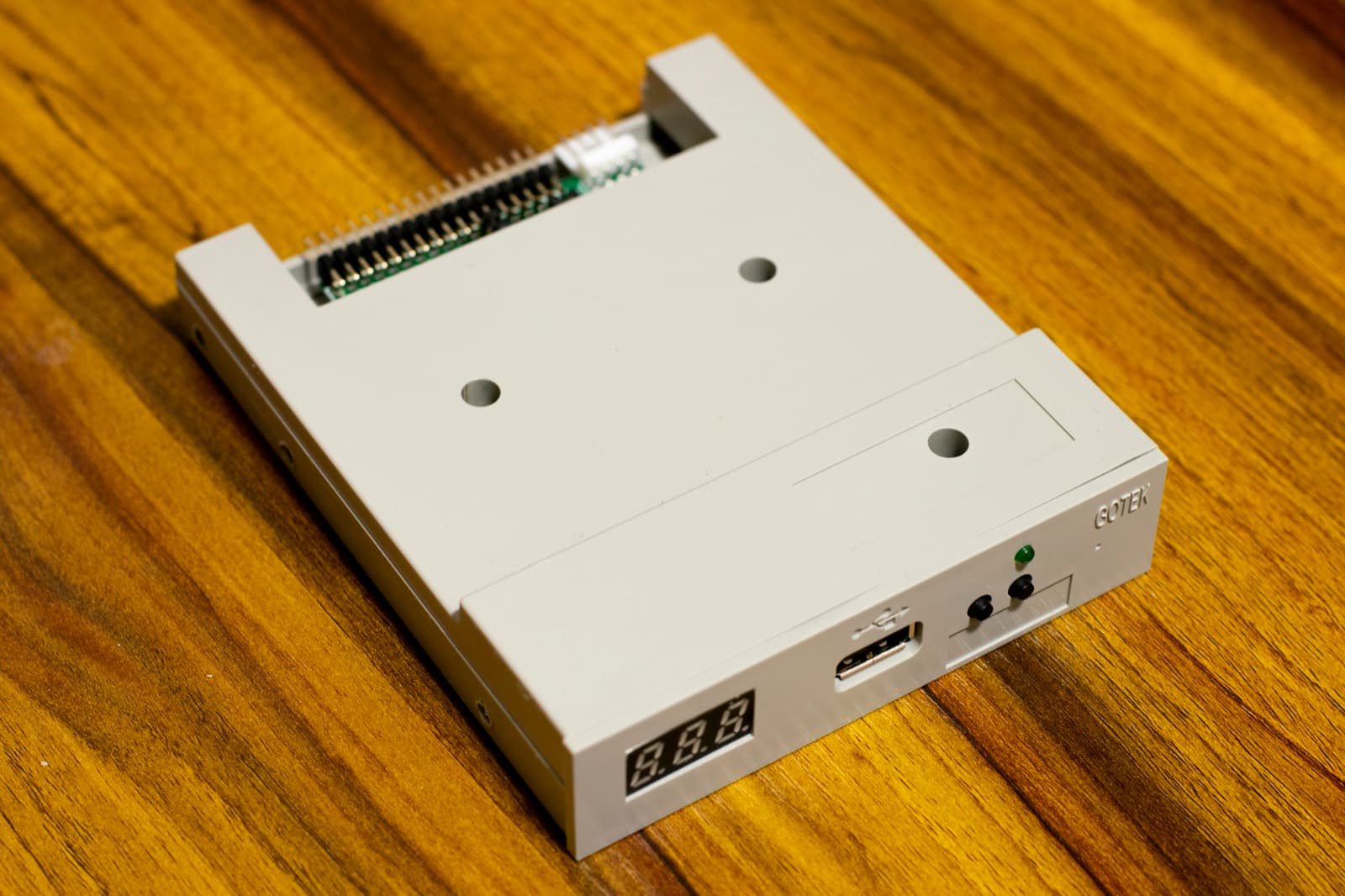
Gotek + FlashFloppy
- Installation: Open and fit
- Reversible
- Open project
Swaps the +3's 3-inch drive for a USB stick with DSK images. According to the project, FlashFloppy is 100% compatible with the TOSEC collection of DSK images, although some need fixing because they lack the weak sector information [10]. On the QL it works with IMG images on floppy interfaces such as the Trump Card and the Super Gold Card [10]. If you prefer real floppies, a PC 3.5-inch drive connects to the +3 as drive B:, with double-density (720 KB) disks [11].
Careful On the +3, the power cable has the +5 V and +12 V swapped relative to the Gotek: without an adapter, you will ruin the Gotek and the USB stick [10]. The +3's data cable has 26 pins and needs adapting to the Gotek's 34, unless you use a model made for the CPC and the +3 [10].
Machines: ZX Spectrum +3, Sinclair QL
Official page ↗Photo: Nicolasfoster · CC0 · Wikimedia CommonsZXpand+
- Installation: Plug in
- Reversible
An all-in-one expansion for the ZX81: 32 KB of static RAM, an SD card built into the LOAD and SAVE commands, an AY/YM sound chip, a joystick and a reset button [12]. It works on every stock ZX81 and TS1000/1500 [12].
Careful Some high-resolution programs need extra mods on the ZX81, known as CHR$128 or UDG [12]. On the TS1500 the interface covers the video and cassette sockets [12].
Machines: Sinclair ZX81, Timex Sinclair 1000
Official page ↗MicroPicoDrive
- Installation: Open and fit
- Reversible
- Open project
An internal replacement for the QL's Microdrives, built around an RP2040, that sits in the drive bay and reads cartridges stored on an SD card [38]. With the original ROM it loads, saves and formats cartridges, and reads MDV and IMG images; the author also wrote a program for preparing the images on a computer [38]. The original Microdrives were one of the QL's reliability problems [34].
Careful At the author's last update, in March 2023, the corrected board was still awaiting confirmation; that was also when it started working with Minerva [38].
Machines: Sinclair QL
Official page ↗
Video
The Spectrum shipped with RF video [13]. Here are the mods for composite video and RGB, the converters for HDMI and VGA, and colour for the ZX81.
Composite video on the 48K
- Installation: Workbench
- Reversible
The Spectrum already generates a composite video signal internally, which feeds the RF modulator; the mod bypasses the modulator and takes that signal straight to the aerial socket [14]. Since the socket is the same type as video sockets, nothing changes on the outside [14]. The picture gets much better, and fewer and fewer televisions have an analogue tuner [14].
Careful Some televisions reject the signal because of an offset of about 2 V; in those cases you fit a 100 µF capacitor instead of the wire [14]. It means soldering inside the modulator box, but it can be undone [14].
Machines: ZX Spectrum 16K / 48K, ZX Spectrum+
Official page ↗RGB via SCART on the 128K models
- Installation: Workbench
- Leaves a mark
The 128 brought an RGB monitor port [13], and the later models kept it [15]. With an RGB to SCART cable you get the best picture the machine gives out of the box [16], but the 128K models don't supply the switching signal that SCART expects, and the picture can show ghosting [15]. The fix takes the 12 V through a resistor to pin 1 of the RGB socket, with different parts on each model [15].
Careful If the 12 V connection touches another part of the circuit, you can permanently damage the ULA or the ASIC [15]. On the 128 and the grey +2, pin 1 carries composite video, which you lose [15]; on the +2A and the +3 that video isn't even on the port, and restoring it is another mod [16].
Machines: ZX Spectrum 128, ZX Spectrum +2, ZX Spectrum +2A / +2B, ZX Spectrum +3
Official page ↗RGBtoHDMI
- Installation: Plug in
- Reversible
- Open project
The same open converter (GPL-3.0), with a Raspberry Pi Zero, that is also used on the Amiga has profiles for the Sinclairs [17]. On the 128, the +2 models, the +2A, the +3 and the QL it connects to the RGB port; on the 48K it reads the YUV signal from the expansion port; on the ZX80 and ZX81 it uses composite video [17] [18].
Careful With the analogue board, the original 128 needs three diodes in the cable, and some Issue 1 or 2 48K boards need links to bring the YUV to the expansion port [18]. The ZX80 and ZX81 need composite video or a 220 ohm resistor in the modulator, which only works for the RGBtoHDMI [18].
Machines: Sinclair ZX80, Sinclair ZX81, ZX Spectrum 16K / 48K, ZX Spectrum+, ZX Spectrum 128, ZX Spectrum +2, ZX Spectrum +2A / +2B, ZX Spectrum +3, Sinclair QL
Official page ↗ZX-HD
- Installation: Plug in
- Reversible
An HDMI interface for the expansion port, with a Raspberry Pi Zero that follows the writes to video memory and builds its own picture [19]. It doesn't require modifying the Spectrum, supports ULAplus's 64 colours and the 128K models' two video memories and, according to the manufacturer, follows the ULA's timing so that border effects come out right [19]. It works from the 16K to the +3 [19].
Careful It needs a Raspberry Pi Zero or Zero W; the Zero 2 was not supported [19]. ByteDelight closed orders in December 2025 [5].
Machines: ZX Spectrum 16K / 48K, ZX Spectrum+, ZX Spectrum 128, ZX Spectrum +2, ZX Spectrum +2A / +2B, ZX Spectrum +3
Official page ↗ZX-VGA-JOY
- Installation: Plug in
- Reversible
A VGA interface with a Kempston joystick and a reset button [21]. It doesn't convert the signal: it works in parallel with the ULA, takes the video data from the processor and gives several modes up to 800x600, synchronised with the ULA for games that depend on that timing [21]. According to the manufacturer, it works on every Sinclair and Amstrad model without modifying the computer [21].
Careful The output is VGA [21]: for an HDMI-only screen you need a converter. The firmware is updated through a micro USB socket under the cover [21].
Machines: ZX Spectrum 16K / 48K, ZX Spectrum+, ZX Spectrum 128, ZX Spectrum +2, ZX Spectrum +2A / +2B, ZX Spectrum +3
Official page ↗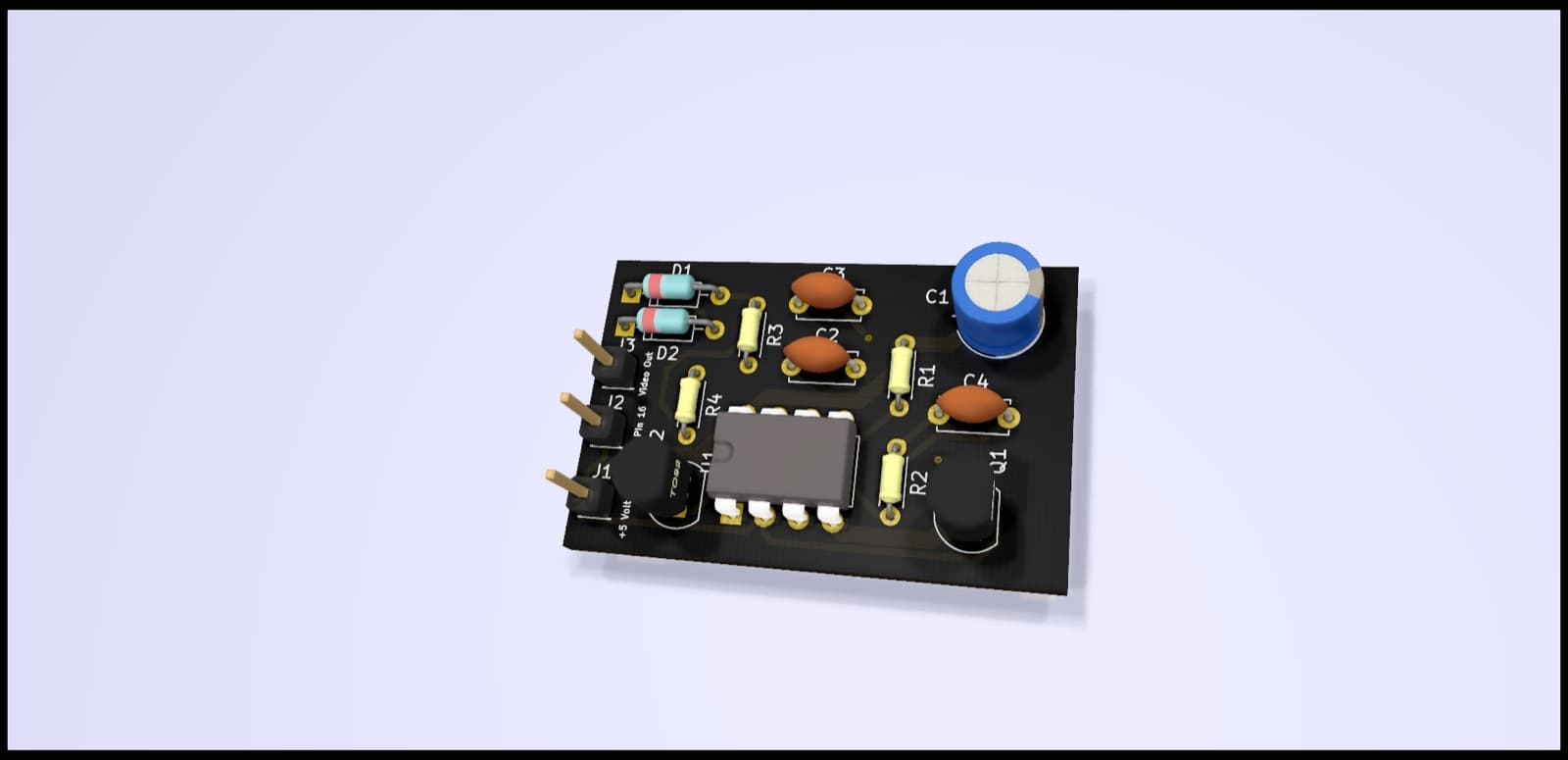
Composite video on the ZX81
- Installation: Workbench
- Leaves a mark
- Open project
A small board that replaces the circuit inside the ZX81's modulator and gives composite video [22]. On ZX81s with the older ULA it also generates the back porch the signal lacks; with the 2C210 ULA, which already produces it, the 555 timer can be left out [22]. There are two open versions, Robert de Boer's (GPL-3.0) and gpimblott's (MIT), both based on the schematics from zx.zigg.net [22] [23].
Careful It means desoldering the modulator box, and removing it without damage can be difficult [23]. Version 2 of gpimblott's board had not yet been manufactured and tested by the author [23]. The image is a 3D render of the board, not a photograph.
Machines: Sinclair ZX81
Official page ↗Photo: Robert de Boer (redhawk668) · GPL-3.0 (repositório) · GitHubChroma 81
- Installation: Plug in
- Reversible
An interface for the ZX81's expansion port that gives an RGB picture via SCART and, for the first time, colour: two modes with up to 15 colours, one of them able to colour old games without altering them [24]. It adds 16 KB of RAM, plus 8 KB for user-defined characters, an RS232 port, an Interface 2-style cartridge slot, a joystick and its own 5 V regulator, so as not to heat up the inside of the ZX81 any further [24]. There is no need to modify the computer [24].
Machines: Sinclair ZX81
Official page ↗
Memory
Modern memory in place of the old chips, which fail easily [26], and turning a 16K into a 48K.
SRAM in place of the 4116 and 4532 chips
- Installation: Workbench
- Leaves a mark
- Open project
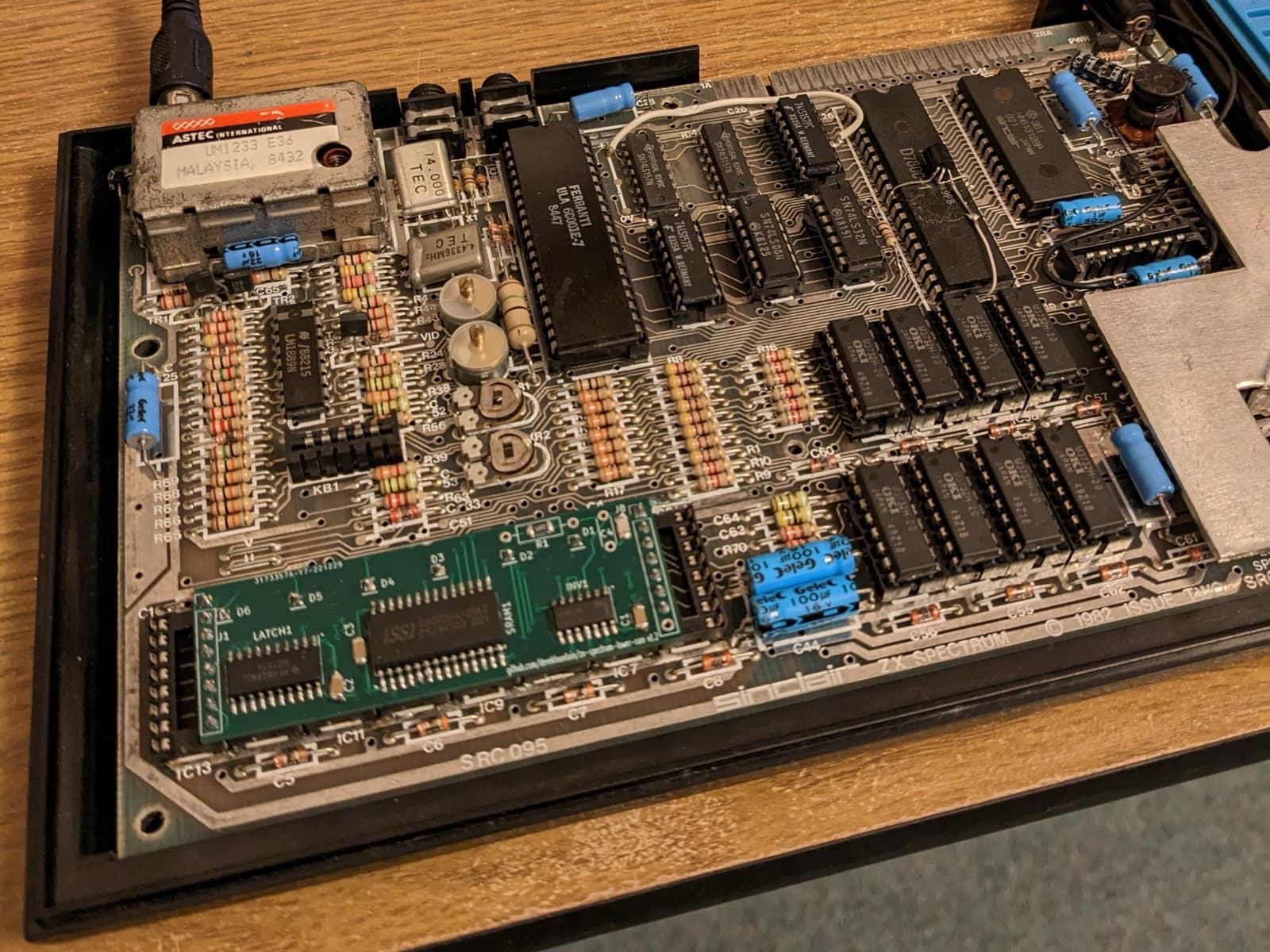
The lower 16 KB of the 16K and 48K sit in eight 4116 chips, which are no longer made and are decades old [25]; when one fails, the Spectrum usually won't even start and shows the classic vertical columns [26]. These modules replace the eight chips with a single modern SRAM [25] [26]. Derek Fountain's is open (GPL-3.0) [25]; Retroleum also makes one for the upper 32 KB, which replaces the eight 4532 chips [26].
Careful The author only tested his module with the Ferranti 6C001E-6 and 6C001E-7 ULAs, and the pins have to be left at 4.2 mm for the keyboard to close [25]. Retroleum's use round pins for turned-pin sockets, which lets you go back to the original chips, but only if the board has those sockets [26].
Machines: ZX Spectrum 16K / 48K, ZX Spectrum+
Official page ↗Photo: Derek Fountain · GPL-3.0 (repositório) · GitHubTurning a 16K into a 48K
- Installation: Workbench
- Leaves a mark
On an Issue 2 or later 16K, the upper memory sockets are empty: you add eight 4164 chips, four logic chips and one or two soldered wire links [27]. At the end, PRINT PEEK 23733 should return 255 [27]. At the time, Sinclair itself offered this upgrade by post [13].
Careful On an Issue 1 there is no room on the board and a daughterboard is needed [27] [13]. A ZX81 32 KB expansion won't do: it isn't compatible [27].
Machines: ZX Spectrum 16K / 48K
Official page ↗
ROM
New ROMs: the +3e system for the +3 and +2A, Minerva for the QL and a diagnostic ROM for repairs.
ZX Spectrum +3e
- Installation: Open and fit
- Reversible
A pair of new ROMs for the +3 and the black +2A, by Garry Lancaster, made with Amstrad's permission to modify and distribute the original ROMs [29]. It fixes bugs in the +3 ROM, adds commands to BASIC and, above all, lets you use hard drives and CompactFlash or SD cards as if they were floppies [29] [30]. The ROMs are free and go in place of the two socketed ones near the expansion port [29] [31].
Careful You need two programmed 27C256 (or 27SF256) EPROMs; keep the originals, 40092 and 40093 [31]. There is no CP/M on the hard drive, and with the Multiface 3 snapshots can only be saved to floppy [30].
Machines: ZX Spectrum +3, ZX Spectrum +2A / +2B
Official page ↗ZX Spectrum Diagnostics
- Installation: Plug in
- Reversible
- Open project
An open (LGPL-3.0) diagnostic ROM for the whole range, from the 16K to the +2A and +3 [32] [33]. It doesn't need a picture to give the first signs: the start-up beeps confirm that the processor and the ULA are working, and then it tests the lower memory with patterns on screen and stripes in the border [32]. It goes in place of the ROM through any device that replaces it; the project supports, for example, Retroleum's SMART Card, the ZXC3 and ZXC4 cartridges and the Dandanator Mini [32].
Machines: ZX Spectrum 16K / 48K, ZX Spectrum+, ZX Spectrum 128, ZX Spectrum +2, ZX Spectrum +2A / +2B, ZX Spectrum +3
Official page ↗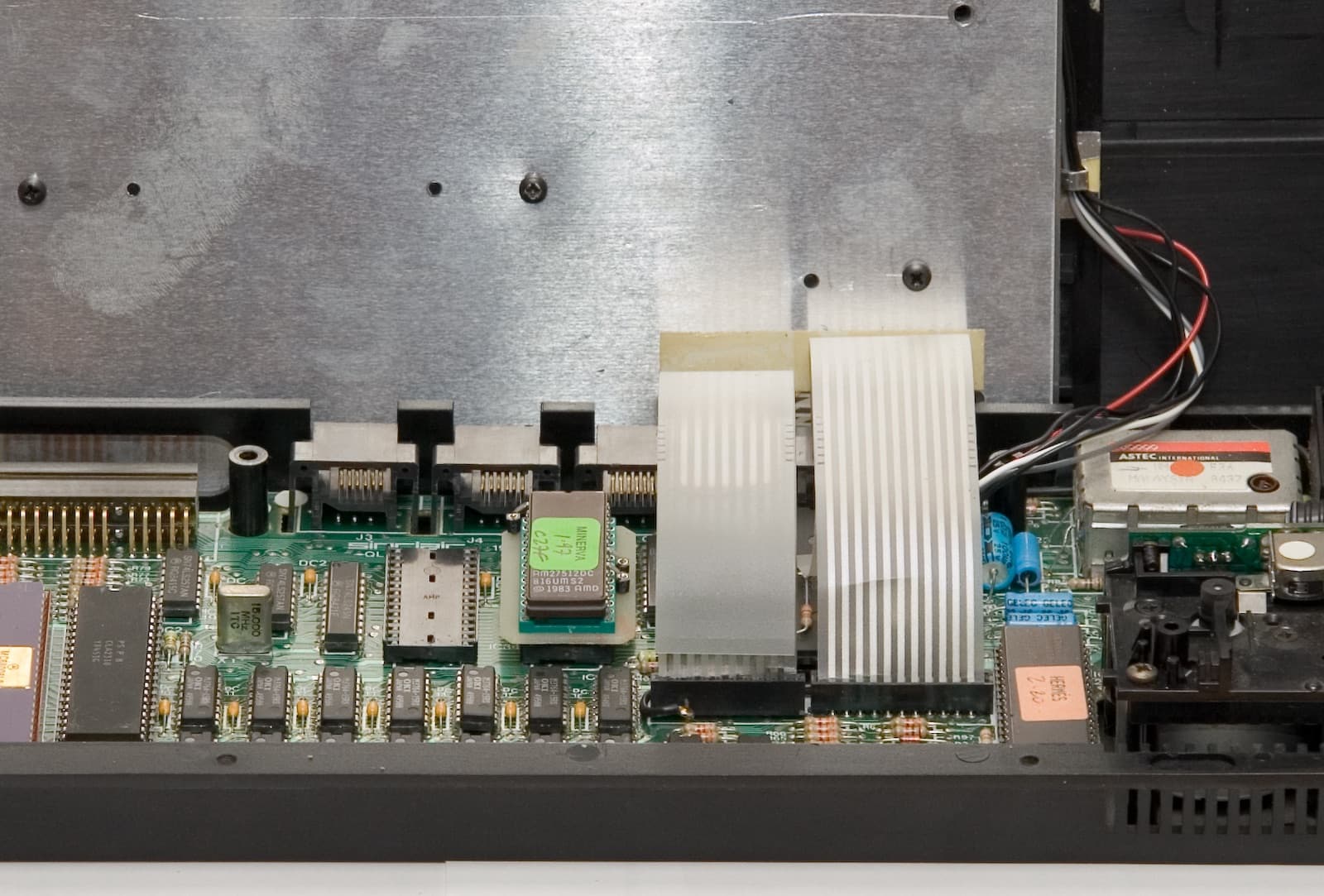
Minerva
- Installation: Open and fit
- Reversible
- Open project
An alternative operating system for the QL, by Laurence Reeves [35], which evolved until it was almost completely rewritten: faster, and with several SuperBASIC interpreters multitasking [34]. It also supports the QL's second screen memory, which the original firmware ignores [34]. The code is published under the GPL-2.0 licence [36].
Careful In the photo, Minerva is the ROM board with the green label; next to it, the Hermes label marks another replacement, the one for the 8049 chip [37].
Machines: Sinclair QL
Official page ↗Photo: Ewx · CC BY-SA 3.0 · Wikimedia Commons
Sound
The three-channel AY chip for machines that lack it, and a fix for the +3's distorted sound.
ZX-AY
- Installation: Plug in
- Reversible
An external interface with a clone of the AY-3-8912, the three-channel sound chip of the 128K models, and with the beeper sound [39]. It plugs into the expansion port without modifying anything and gives ABC or ACB stereo [39]. On the 16K and 48K it gives access to the many games and demos with AY music that also run on those machines; on the 128K models it swaps the original sound for stereo [39].
Careful It doesn't reproduce the cassette loading sound, and the output socket doesn't accept a mono plug [39]. ByteDelight closed orders in December 2025 [5].
Machines: ZX Spectrum 16K / 48K, ZX Spectrum+, ZX Spectrum 128, ZX Spectrum +2, ZX Spectrum +2A / +2B, ZX Spectrum +3
Official page ↗Sound fix for the +3 and +2A
- Installation: Workbench
- Leaves a mark
The Z70830 board of the +3 and the early +2A has a fault in the amplifier circuit that badly distorts the sound [40] [41]. Amstrad fixed it on the +2B and +3B board, and the same changes apply to the +3: swapping seven resistors, adding two and, in the improved version, removing capacitor C37 [40] [41]. According to Spectrum for Everyone, the result beats the sound of a +2B [40].
Careful Check the board first: only the Z70830 needs this [40]. Some of the new resistors have no place on the board, and one of them means lifting a transistor's leg [41].
Machines: ZX Spectrum +3, ZX Spectrum +2A / +2B
Official page ↗
Interfaces
Classic interfaces rebuilt with today's parts.
ZX Multiface 3 Enhanced
- Installation: Plug in
- Reversible
A modern recreation of Romantic Robot's Multiface 3, the interface for the +3 that freezes any program to copy it between cassette and disk and brings tools for studying it [42]. This version adds a dual ROM, a reset button and a Kempston joystick port that can be switched off [42]. The author tested it on the +3, including with the +3e ROMs [42].
Careful On the +2A and +2B copies can only be made to cassette [42]. The licence (CC BY-NC-SA) forbids commercial use, and selling it requires the author's permission [42].
Machines: ZX Spectrum +3, ZX Spectrum +2A / +2B
Official page ↗
Networking
Ethernet for the Spectrum, with programs loaded from a server.
Spectranet
- Installation: Plug in
- Reversible
- Open project
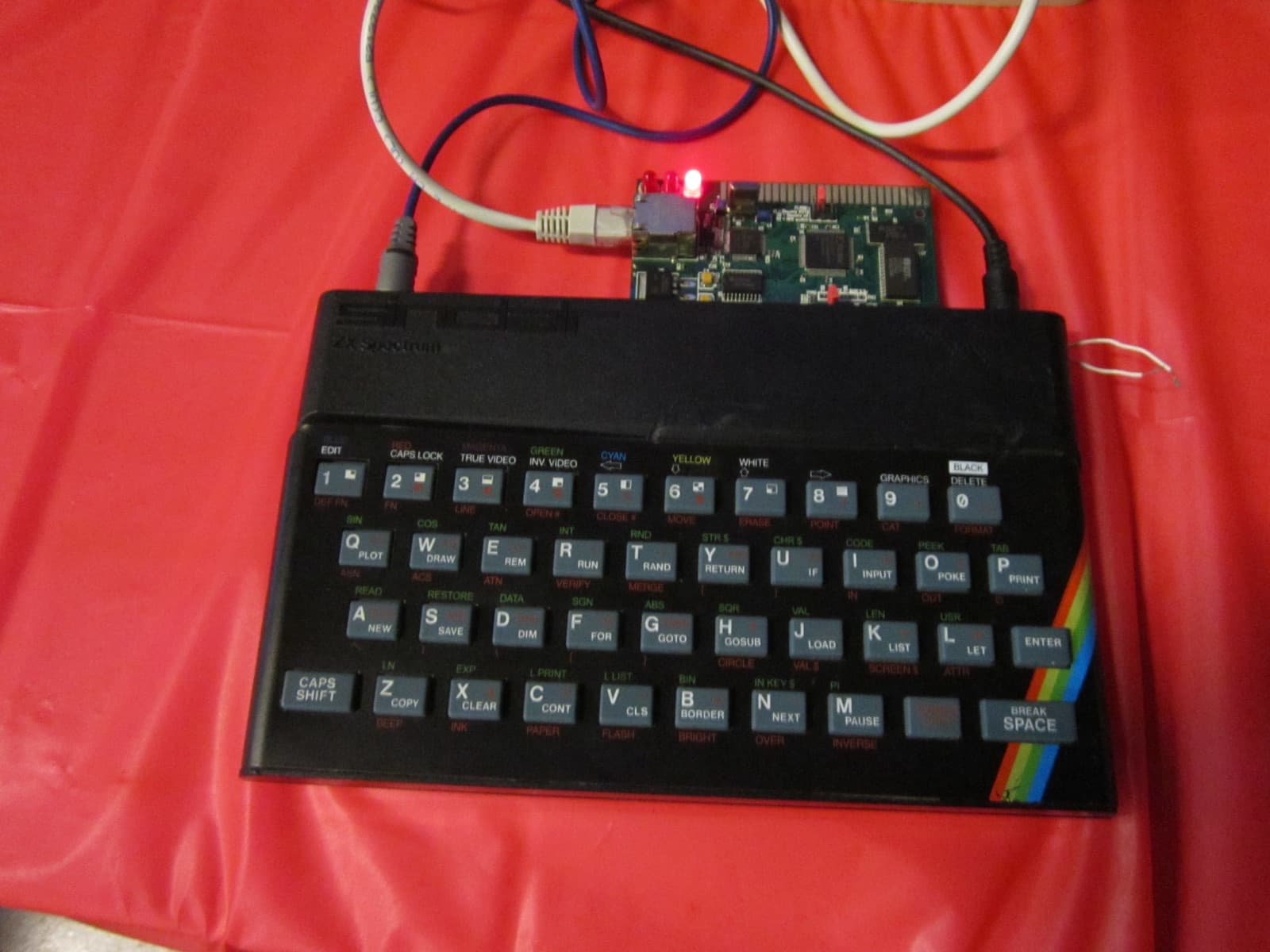
An Ethernet board for the expansion port, with the W5100 controller, which handles TCP/IP in hardware, 128 KB of flash and 128 KB of RAM [46]. It brings BASIC extensions, a BSD-style sockets library and the TNFS network file system, for loading programs from a server [46] [44]. The code and hardware are open, under the MIT licence [43] [45].
Careful The +3 and the black +2A need jumper J3 fitted; the other models, without it [44]. On the 128K models the BASIC extensions only work in USR 0 [44]. ByteDelight had made it since 2019 [46] and closed orders in December 2025 [5].
Machines: ZX Spectrum 16K / 48K, ZX Spectrum+, ZX Spectrum 128, ZX Spectrum +2, ZX Spectrum +2A / +2B, ZX Spectrum +3
Official page ↗Photo: Rept0n1x · CC BY-SA 3.0 · Wikimedia Commons
Power
Regulators that don't run hot and new supplies to replace the originals. Never open the 230 V side of a supply.
Switching regulator in place of the 7805
- Installation: Workbench
- Leaves a mark
The original 7805 is cheap but inefficient and runs hot [26]. Switching modules from TRACO, RECOM or Murata fit in its place, give the same 5 V and barely warm up, so the heatsink is no longer needed [26] [47]. They suit the ZX80, the ZX81, the 16K and the 48K [47] [26], and the vertical Murata version also the 128 [26].
Careful On an Issue 2 in a rubber-key case there is no room for the vertical version: you need the horizontal-mount one [26]. According to Retroleum, the Murata modules give 1.5 A, while unbranded modules stop at 1 A [26].
Machines: Sinclair ZX80, Sinclair ZX81, ZX Spectrum 16K / 48K, ZX Spectrum+, ZX Spectrum 128
Official page ↗New power supply
- Installation: Plug in
- Reversible
From the 16K to the grey +2, the machine uses 9 V with negative on the centre pin, and a modern 9 V, 2 A switching supply will do [48] [54]. The +2A and the +3 no longer generate the voltages internally and need their own supply, with several outputs [50].
Careful Never open a supply, new or old: the 230 V side is dangerous. The +2A's supply gives only 200 mA on the 12 V rail and won't do for a +3, which needs 700 mA [50]. Some new supplies for the +2A and +3 don't provide the -12 V that the RS232 and MIDI ports need [49]. The original UK 1200 can only handle a 16K [51].
Machines: ZX Spectrum 16K / 48K, ZX Spectrum+, ZX Spectrum 128, ZX Spectrum +2, ZX Spectrum +2A / +2B, ZX Spectrum +3
Official page ↗
We fit it for you
Bring the machine and the upgrade, or ask us for advice before you buy. We check the machine first: putting an accelerator in an Amiga with leaking capacitors is money thrown away.
- Composite video mod
- €30.00
- Upgrade installation (one item)
- €24.00
- Upgrade installation (up to 3 items)
- €54.00
Sources
- [1]DivIDE · Sinclair Wiki
- [2]DivMMC · GitHub (Mario Prato)
- [3]ESXDOS · esxdos.org
- [4]DivMMC EnJOY! PRO ONE · ByteDelight (Internet Archive), 2025
- [5]Site is undergoing maintenance (aviso de fecho) · ByteDelight (Internet Archive), 2025
- [6]Spectrum compatibility issues · Spectrum for Everyone
- [7]MaxDuino · GitHub (Rafa Molina)
- [8]TZXDuino · GitHub (sadken)
- [9]TzxDuino-Reloaded · GitHub (arananet)
- [10]FlashFloppy: Host Platforms · GitHub wiki (Keir Fraser)
- [11]External floppy drives on the Spectrum +3 · Sinclair Wiki
- [12]ZXpand Online Manual · GitHub wiki (Charlie Robson)
- [13]ZX Spectrum · Wikipédia (en)
- [14]Composite Mod for the 48K range · Spectrum for Everyone
- [15]Making your 128/+2/+2A/+3 RGB socket SCART compliant · Spectrum for Everyone
- [16]Modifying a +2A or +3 to Output Composite on the RGB Port · Spectrum for Everyone
- [17]RGBtoHDMI: Supported Computers · GitHub wiki (hoglet67)
- [18]RGBtoHDMI: Cables · GitHub wiki (hoglet67)
- [19]ZX-HD HDMI interface · ByteDelight (Internet Archive), 2025
- [20]ULAplus · Sinclair Wiki
- [21]ZX-VGA-JOY: ZX Spectrum VGA and Joystick interface · zx-vga-joy.com
- [22]ZX81 Composite Video with Backporch · GitHub (Robert de Boer)
- [23]ZX81-Composite-mod-PCB · GitHub (gpimblott)
- [24]ZX81 Chroma 81 SCART Interface · fruitcake.plus.com (Paul Farrow)
- [25]zx-spectrum-lower-ram · GitHub (Derek Fountain), 2023
- [26]Spectrum Chips · Retroleum
- [27]Upgrading a 16K Spectrum to 48K · Spectrum for Everyone
- [28]Recapping your Spectrum · Spectrum for Everyone
- [29]Introducing the ZX Spectrum +3e · World of Spectrum (Garry Lancaster)
- [30]+3e: Features and limitations · World of Spectrum (Garry Lancaster)
- [31]+3e ROMs · World of Spectrum (Garry Lancaster)
- [32]ZX Spectrum Diagnostics: Firmware · GitHub wiki (Brendan Alford)
- [33]zx-diagnostics · GitHub (Brendan Alford)
- [34]Sinclair QL · Wikipédia (en)
- [35]Sinclair QDOS · Wikipédia (en)
- [36]Minerva Sinclair QL operating system · GitHub (MarcelKilgus)
- [37]File:QL-inside.jpeg · Wikimedia Commons (Ewx), 2007
- [38]MicroPicoDrive · GitHub (Agustín Gimenez Bernad)
- [39]ZX-AY External Stereo audio interface · ByteDelight (Internet Archive), 2025
- [40]Fixing Audio Distortion on the Spectrum +3 · Spectrum for Everyone
- [41]Improving the audio quality on the +2A/+3, +2B, and +3B · zxnet.co.uk
- [42]ZX Multiface 3 Enhanced · GitHub (merlinkv), 2024
- [43]Spectranet · spectrum.alioth.net
- [44]Spectranet: Guide · spectrum.alioth.net
- [45]spectranet · GitHub (Dylan Smith)
- [46]Spectranet · Sinclair Wiki
- [47]Recom 5V 1A DC-DC converter voltage regulator · ByteDelight (Internet Archive), 2020
- [48]Modern switching 9V 2A PSU for ZX Spectrum 16/48/128K/+2 · ByteDelight (Internet Archive)
- [49]Modern switching 5V+12V replacement PSU for ZX Spectrum +2A/+2B/+3 · ByteDelight (Internet Archive)
- [50]Replacement PSU for +2A or +3 Machines · Spectrum for Everyone
- [51]Sinclair power supplies · Sinclair Wiki
- [52]Modern hardware · Sinclair Wiki
- [53]Performing the IN FF mod on a Spectrum +2A / +3 · Spectrum for Everyone
- [54]Peripherals For The Spectrum · Retroleum